Showing posts with label jQuery. Show all posts

Friday, 21 June 2019

Cool Free Responsive HTML5 CSS3 Website Templates [2018 Edition]

Everyone knows building a website can be tedious. But there are simple ways (that still require some work to be done). For one, you can use WordPress (Marshall Hardy kindly explained everything in great detail) or you can use one of many free templates, that can be found all over the internet.
I’ve gathered some just for you. Enjoy!

Boxus — Free HTML5 Bootstrap Template for Agency, Web Design, and Software Company

Boxus is a fresh, innovative, vibrant, and one page free creative agency website template. It’s stunning because of its unique layout which is responsive, as well. On the top of that, it comes up with the latest JavaScript plugins which make the template more efficient and robust. Keep in mind that, an illuminating and awe-inspiring free HTML template reduces time-consuming and increases productivity. Download Boxus and finish the project you have been dreaming for days.

AweSplash — Multiple Free HTML5 Splash Screen Pages

AweSplash is a nice fit as a welcome page or any other landing pages to launch new products or announce upcoming events. Its main attractiveness is its 4 different demo pages. Ready to suit your various purposes.

Conceit — Corporate Category Bootstrap Responsive Web Template

Conceit is a modern theme multipage multipurpose template for business and corporate related website. It is a great high-performance corporate theme with a modern creative design to delight a multitude of creative users for building their websites. This template comes with necessary features for your online existence like projects portfolio page, about page, contact page, 404 page, latest blogs, testimonials, team and newsletter subscribe form etc. It is a comprehensive business consulting theme that offers everything that a potential customer seeks from a website.

Asentus — Free Responsive Bootstrap Corporate Agency HTML5 Template

If you are thinking of a light-weight, flexible, easy to customize, free for commercial and personal use, cutting-edge corporate agency website template; Asentus is for you. This is a free responsive bootstrap corporate agency HTML5 template. A super clean, elegant style, minimal agency website template.

Flex Art — a Corporate Category Bootstrap Responsive Web Template

Flex Art is a neat template that is fully responsive, uses modern and elegant design and font awesome icons. Has a clean and clear structure, well commented code, cool hover effects. Built upon Bootstrap Framework Version 4.

Corporative — a Corporate Category Flat Bootstrap Responsive Web Template

Corporative is a business and corporate themed multipurpose template, a smart choice for all your corporate related websites in order to boost your online presence and expand your business via online by using this smart and elegantly designed template.

Incorporated — a Corporate Category Flat Bootstrap Responsive Web Template

Incorporated is a corporate themed multipurpose template a fine solution for your business to boost your profits via online by using this unique and modern design template. This elegant and creatively designed template is also a perfect choice for related websites like Agency, Company websites, promoting your services, Financial Services, etc. This template is 100% responsive cross browser template, compatible on all devices, displayed on all screen sizes. It is entirely built in Bootstrap framework, HTML5, CSS3 and JQuery.

CreativeX — Creative Flat Website Template with HTML, CSS, Bootstrap

CreativeX is a creative and flat website template for designing organizational or corporate sites. It is amazingly designed with HTML, CSS, and Bootstrap. This template comes with 8 HTML pages which include the Home and About pages. It also includes animated portfolio listings with a single view.

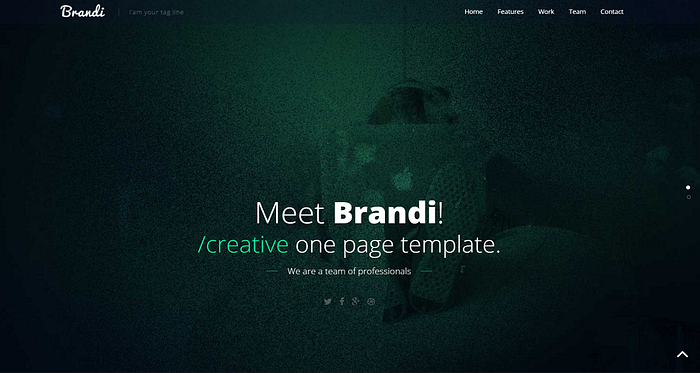
Brandi- Free One Page Responsive HTML5 Business Template

Brandi is free one page responsive HTML5 business template for office, agency or personal business like website. It is designed with HTML5, Bootstrap, CSS3 and jQuery.

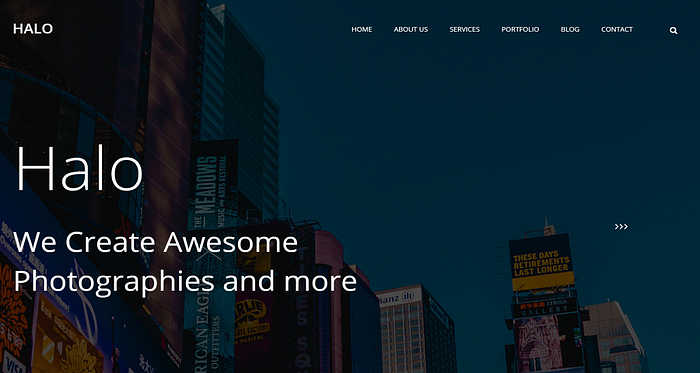
Halo — A Free Multi-Page CSS Website Template

Halo is a photography website built with CSS. It’s one of the best free website templates for personal websites. This is a multi-page CSS website template. The neat segmentations and layouts differentiate this template from the others in the list. No outlandish animation and interaction designs here — just simplicity.

Clean Blog — Free Bootstrap theme for blog website design

Clean blog is a carefully styled Bootstrap blog theme that is perfect for personal or company blogs. This theme features four HTML pages including a blog index, an about page, a sample post, and a contact page.

Stylish Portfolio — Bootstrap portfolio theme

Stylish Portfolio is a one page Bootstrap portfolio theme with off canvas navigation and smooth scrolling through content sections.

Sonar — Custom-scrolling free HTML5 photography template

Sonar is the all-new free HTML5 photography template. It elevates your photography to a new level of creativity and engagement. No matter the destination, you can get there faster than ever with Bootstrap 4, unconventional design, brilliant graphics, and more.

John Doe — Free Responsive HTML5 One Page Template

John Doe has an unusual classic design that surely will catch your clients attention. It is built with the best CSS Framework- Bootstrap and with the latest version of it. Also, it comes with eye catchy CSS3 animation and jQuery plugin. The color combination of John Doe is impressive and classy and just works great with the subtle design, which is perfect for your portfolio.

Free Responsive Design Agency Template

This clean responsive theme is a perfect basis for displaying a vast amount of content in a coherent manner, thus promoting your web design agency or other projects related to this business niche. Though, transformative power of this theme allows you to customize it seamlessly to meet the needs of a particular website.

Free Responsive HTML5 Theme for Photo Site

Welcome free responsive theme to set up online portfolio and share works online. Sleek design in popular today “flat colors”, gallery as a focal point and intuitive navigation will perfectly work for better online promotion of works.

Free HTML5 Single Page Theme

The design is perfect for presenting design agency or CV of creative artists online. Its navigation is facilitated with fixed header (company logo and menu) and back-to-top button. Add minor changes into this design, and get the desired web presence.

Free HTML5 Theme — Design Studio

Free HTML5 theme is what you need for an artfully tailored upgrade of web design agency, architecture bureau, art ‘photograph’ site, exterior & interior project, etc. Adding minor changes into its core, you’ll get the desired website design that will invite visitors with its contemporary clean look and user-friendly layout.

Global — HTML5 Website Template

Global is a modern and sleek website template crafted for professionals in the creative industry. Global can serve as a single page portfolio or be easily modified to serve as the perfect beginning for a hip creative agency.

Photon

Photon is a free one-page HTML5 template that supports images with parallax effect and buttons with some fantastic hover effects. Choose this template to give your online resume a striking look.

Landed

If you need an up-to-date website with advanced functionality, the Landed template would be the perfect choice for you. It features a full-screen hero image at the top of the homepage, and comes with support for lazy-loading images, parallax effect layouts, and much more.

Have a nice day!

Friday, 12 July 2013

A JSON Tutorial. Getting started with JSON using JavaScript and jQuery

Javascript has grown from a way to add interactivity on your page, to a language that lets you perform tasks that once belonged to servers. JSON provides for an easy way to create and store data structures within JavaScript. It’s super popular and a great alternative to XML. JSON stands for JavaScript Object Notation…it’s called that because storing data with JSON creates a JavaScript object. The JavaScript object can be easily parsed and manipulated with JavaScript.
Where XML is arguably easier to read, but notoriously difficult to parse (describe to a computer), JSON makes it a breeze to store data in a format that machines dig. Once you encode the data with JSON, you can read it into a variable which creates an object. Really cool stuff. Let’s take a look.
<script>
    var data={ "firstName" : "Ray" };
    alert(data.firstName);
</script>

Breaking JSON down

First, we create a variable to hold our data, and then we use JSON to define our object. Our sample object above is a simple as it gets. Just an item called firstName and it’s value Ray. When using strings with JSON, you should use them with quotations as above. If you use numbers, then you don’t have to use quotations.
This example will cause your browser to alert you with the variable name.
Creating a JSON object is easy

Creating an object placeholder

That’s great. Let’s go ahead and make it a bit more realistic by inserting our JSON data into an object in the DOM.
<div id="placeholder"></div>
    <script>
        var data={"firstName":"Ray"};
        document.getElementById("placeholder").innerHTML=data.firstName;
    </script>
So now at least we’re putting the data inside an HTML element instead of an alert. The JSON data, of course can be much more complex. Let’s try adding some more fields.
<div id="placeholder"></div>
<script>
  var data={
    "firstName":"Ray",
    "lastName":"Villalobos",
    "joined":2012
  };
  document.getElementById("placeholder").innerHTML=data.firstName+" "+data.lastName+" "+data.joined;
</script>
A couple of things about these changes…First, you’ll see that we added a bit of formatting to our JSON data. That’s just to make sure it’s easier to read for humans; you’ll often find JSON data formatted in this manner. The second thing is that the “joined” value (2012) didn’t need quotations because its a number. That’s still pretty simple data. Let’s try something more complex.

Adding Arrays

What if we wanted to enter a bunch of people…then we have to add array notation. You create arrays in JSON using brackets []. Let’s see how our data would look for a couple of users.
<div id="placeholder"></div>
<script>
var data={"users":[
        {
            "firstName":"Ray",
            "lastName":"Villalobos",
            "joined":2012
        },
        {
            "firstName":"John",
            "lastName":"Jones",
            "joined":2010
        }
]}

document.getElementById("placeholder").innerHTML=data.users[0].firstName + " " + data.users[0].lastName+" "+ data.users[0].joined;
</script>
This looks more complicated, but it’s not really too hard to understand. Every object in jason is stored with curly braces {}, an array is stored with brackets[]. So in order to organize our data, we created an object called users, which held an array (using brackets). That object had a couple of other objects…each stored like before with curly braces {}. Each element in that object was separated by commas.
Notice that we obviously had to change our code for inserting the name. We had to include the new users object and then specify bracket notation to specify our first element in the array. Let’s add another level of complexity to our data structure just for kicks.
<div id="placeholder"></div>
<script>
    var data={"users":[
            {
                "firstName":"Ray",
                "lastName":"Villalobos",
                "joined": {
                    "month":"January",
                    "day":12,
                    "year":2012
                }
            },
            {
                "firstName":"John",
                "lastName":"Jones",
                "joined": {
                    "month":"April",
                    "day":28,
                    "year":2010
                }
            }
    ]}

    document.getElementById("placeholder").innerHTML=data.users[0].firstName + " " + data.users[0].lastName+"--"+ data.users[0].joined.month;
</script>
Simple JSON Output
Just one tiny level of complexity. We just added multiple fields to the joined object. We didn’t need an array here, just a series of objects, so we used the object notation. This is great and we’ve got some pretty good data, but now that we have multiple users, it’s time to go through each user and output them into a list.

Traversing the user list

So, if we want to go through the user list, we could simply use JavaScript’s for statement to take care of that. We’ll put the items inside a list.
<div id="placeholder"></div>
<script>
    var data = { "users":[
            {
                "firstName":"Ray",
                "lastName":"Villalobos",
                "joined": {
                    "month":"January",
                    "day":12,
                    "year":2012
                }
            },
            {
                "firstName":"John",
                "lastName":"Jones",
                "joined": {
                    "month":"April",
                    "day":28,
                    "year":2010
                }
            }
    ]}

    var output="<ul>";
    for (var i in data.users) {
        output+="<li>" + data.users[i].firstName + " " + data.users[i].lastName + "--" + data.users[i].joined.month+"</li>";
    }
    output+="</ul>";

    document.getElementById("placeholder").innerHTML=output;
</script>
So here, we use a for statement and created a variable called output to temporarily store the data. Once we go through all of the elements in the array, we use the output variable to populate the placeholder div. That works well, but as you can tell, our data structure is getting a little long.

Reading JSON from an external file

It would be nice if we could store this on an external file and then just read everything into the data variable. To make things easier, I’m going to use jQuery, so we’ll have to load that library first and then call it’s getJSON function. Here’s what our entire page’s code looks like.
<!DOCTYPE html>
<html lang="en">
<head>
    <meta charset="utf-8" />
    <title>JSON Sample</title>
</head>
<body>
    <div id="placeholder"></div>
    <script src="http://code.jquery.com/jquery-1.7.1.min.js"></script>
    <script>
  $.getJSON('data.json', function(data) {
        var output="<ul>";
        for (var i in data.users) {
            output+="<li>" + data.users[i].firstName + " " + data.users[i].lastName + "--" + data.users[i].joined.month+"</li>";
        }

        output+="</ul>";
        document.getElementById("placeholder").innerHTML=output;
  });
    </script>
</body>
</html>
The resulting output from our final document
Pretty much the same code as before without the data file. We just wrap everything inside jQuery’s getJSON function, which does the hard job of reading the file. Assuming the file is in the same directory here’s what our new data.json file looks like.
{"users":[
        {
            "firstName":"Ray",
            "lastName":"Villalobos",
            "joined": {
                "month":"January",
                "day":12,
                "year":2012
            }
        },
        {
            "firstName":"John",
            "lastName":"Jones",
            "joined": {
                "month":"April",
                "day":28,
                "year":2010
            }
        }
]}
Pretty much as before. As you can see, JSON is really easy to read and once you get used to the curly braces and brackets, not too hard to encode.